Set a grocery budget and watch the total as you shop
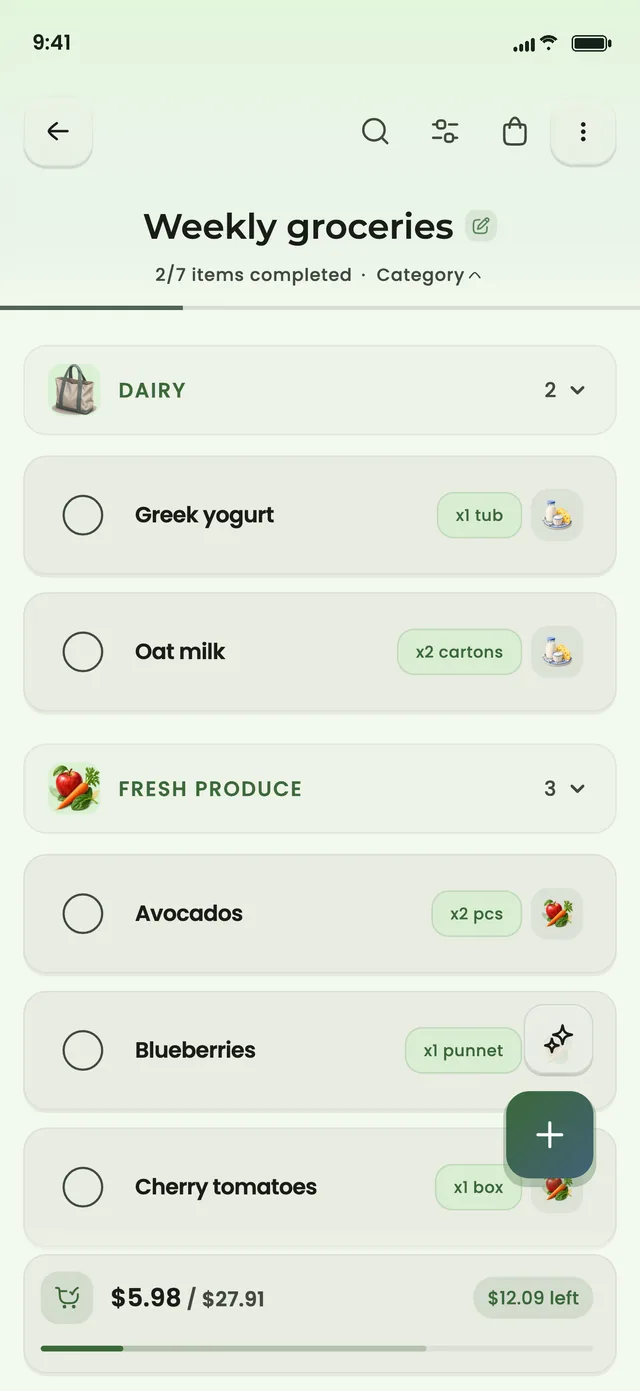
ListAIse is a grocery list that does the sums. Type a price when you add an item, give the list a budget, and a bar at the bottom shows what you've spent, what the whole list will cost and how much is left. Budgets, prices and price history are free.
By Raza Abbas, ListAIse developer. Updated .
Three steps to a list that knows its cost
-
Type the price with the item
Write milk 3.49 in the add field and Milk lands on the list priced at 3.49 in your currency. A small chip shows the price before you add it, so you can tap it away if the number was part of the name.
-
Give the list a budget
Open the list's options, go to Organization and type a limit under Budget. Every list can have its own: one for the weekly shop, another for a party or a camping trip.
-
Shop and watch the bar
Ticking an item moves its price into "spent". The bar shows the full list total, how much budget is left or how far over you are, and how many items have a price, so a half-priced list doesn't fool you.
How do you add prices without slowing down?
Write prices the way you'd scribble them on paper. A bare number with two decimals is read as a price: bread 2.79. You can also use a currency symbol or an @ sign: milk $3 or 2 milk @1.20, which means two cartons at 1.20 each.
Counts and sizes stay as they are. "eggs 12", "milk 2%" and "7up" are names, not prices, so you don't end up with a 12-dollar egg. For anything else, open the item and type a price per unit or for the whole quantity.
Coming back from the store? Scan the receipt and the prices you actually paid go onto the matching items.
What happens when you go over budget?
The app doesn't block anything. The bar switches from "left" to "over", the list gets a small red dot on your Lists screen, and when you finish, the "All done" card says whether the trip came in under budget or over it. In shop mode a line shows what's in your basket and what's still left to buy.
The point is to see the number while you can still act on it: put the second bag of chips back, or swap the branded pasta for the store brand, before the cashier tells you the total.
Does it remember what you paid last time?
Yes. Every time an item's price changes, ListAIse saves a dated entry. Open the item to see its last four prices and whether the price is going up or down, or open the full log. Items sold by weight or volume show a price per kg or per litre, both in the history and on the list row, so a 500 g pack and a 1 kg pack compare at a glance.
Premium adds one more line under the price: the lowest you've paid for that food and at which store, for example "Lowest you've paid: 3.99/kg · Lidl". It's built from your own purchases and isn't shared with the rest of the household.
Can a household share one budget?
A budget belongs to a list, so everyone on a shared grocery list sees the same total and the same amount left. If your partner ticks the cheese at one store while you pick up bread at another, both phones show the new figure. Owners and editors can change the budget; people invited as viewers can follow along. Sharing a list is free on every plan.
Where does the money go over a few months?
Spending insights, in any grocery list's options, adds up the prices on your lists: planned spending, the average per list, how many lists have a budget and how much of it they use, a six-month trend, and your top lists and categories. With an account, it also keeps your last ten finished trips, each with the store, date, item count and total, so you can open an old receipt and compare.
What's free and what needs Premium?
- Free: budgets on every list, typed prices, the running total, price history and trends, spending insights, and 5 receipt scans to try.
- Premium ($1.99/month or $19.99/year): the lowest price you've paid, the cost of each planned meal, 50 receipt scans a month and no ads.
What it doesn't do
ListAIse doesn't connect to your bank or a store loyalty card, and it doesn't look up shelf prices. Every number comes from you: what you type, or what a scanned receipt says. That keeps it simple and private, but a total is only as complete as the prices on the list. The "N of M priced" count tells you how much of the list it covers.
Keep going
- Grocery saving tips that work with or without an app.
- Receipt price tracking: what the scanner reads and how accurate it is.
- Track a grocery budget: the step-by-step guide.
- Best grocery list apps: how ListAIse compares with the others.
Try it on this week’s shop
Say what you need, paste a recipe link or snap a receipt. You get a list sorted by aisle, ready to share.
Free on iPhone, iPad, and Android. Premium $1.99/month or $19.99/year.